
Customer loyalty programs are becoming one of the most important tools for restaurants, cafés, bubble tea shops, and F&B businesses in Malaysia. If you are looking for a simple guide on how to register customer as Member in FeedMe, FeedMe POS allows businesses to easily register customers as members through the POS terminal using their mobile number or QR code, while also collecting loyalty points, offering rewards, and improving repeat customer retention.
In this guide, we’ll explain how the FeedMe membership system works, how to register customers as members on FeedMe POS, and how customers can use their memberships through the FeedMe App.
Why Use FeedMe Membership?
FeedMe’s built-in membership and loyalty system helps F&B businesses:
- Build a customer database
- Encourage repeat visits
- Reward loyal customers
- Track customer spending habits
- Run promotions and marketing campaigns
Instead of relying on physical membership cards, FeedMe enables restaurants to manage everything digitally through the POS system and customer mobile app, making membership registration faster and more convenient.
How Membership Works in FeedMe POS
The FeedMe membership system is directly connected to:
- POS transactions
- QR ordering
- Customer accounts
- Loyalty points
- Promotions and vouchers
Once customers are registered as members:
- Their purchases are automatically recorded
- Loyalty points can be collected after payment
- Rewards can be redeemed during future visits
This creates a smoother customer experience while helping restaurants improve customer retention and customer engagement.
Step-by-Step: How to Register Customers as Members on FeedMe POS
Step 1 — Open the Store icon or Customer Section
On the FeedMe POS terminal:
- Direct to the Store icon at the bottom of the pos, or
- Navigate to > “Customer”
You can add scan QR, key in phone number to:
- Search existing members
- Add new customers
- View loyalty credit points
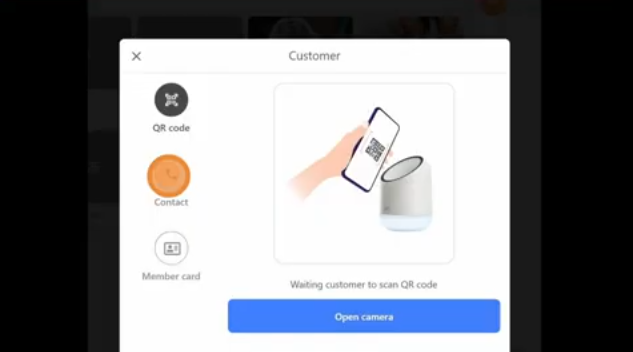
Step 2 — Key in Phone Number
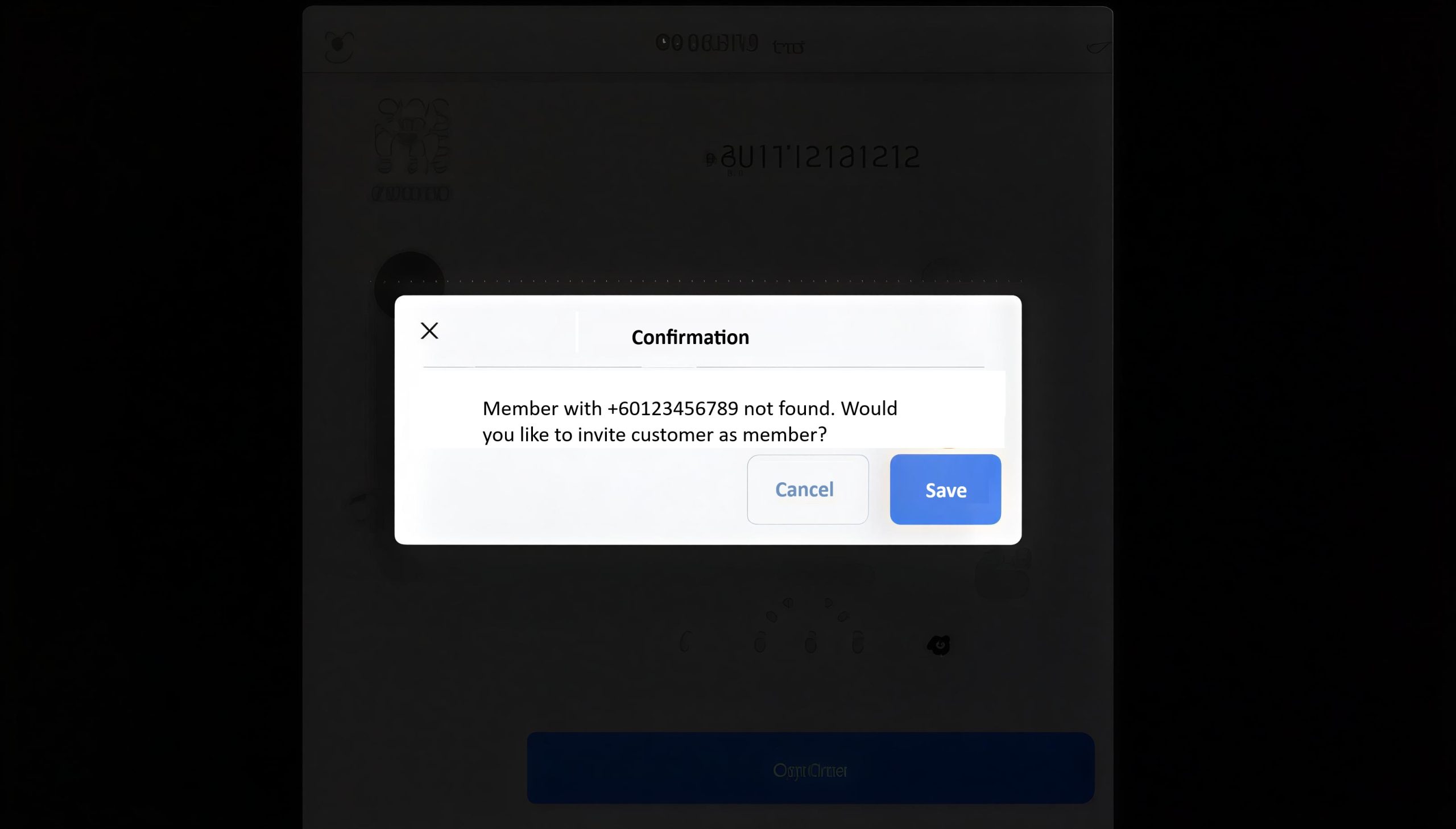
Customer first time register will show this popup messages, which allow you to invited them to join as a member by sending the sms messages to their phones.
They can register as a member via the link in the sms message.
Step 3 — Customer Information
If the customer is already a member, it will show member account like this. All benefits and vouchers in the member account show here to let staff apply benefits or vouchers in the current bill.
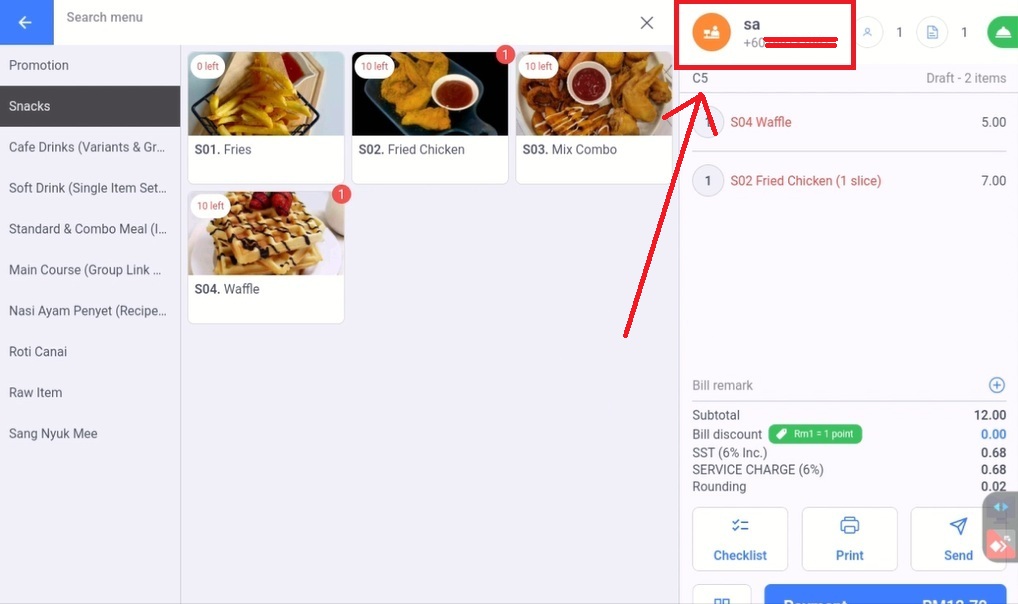
You can click “Apply Membership”, order items and make payment in POS as usual.
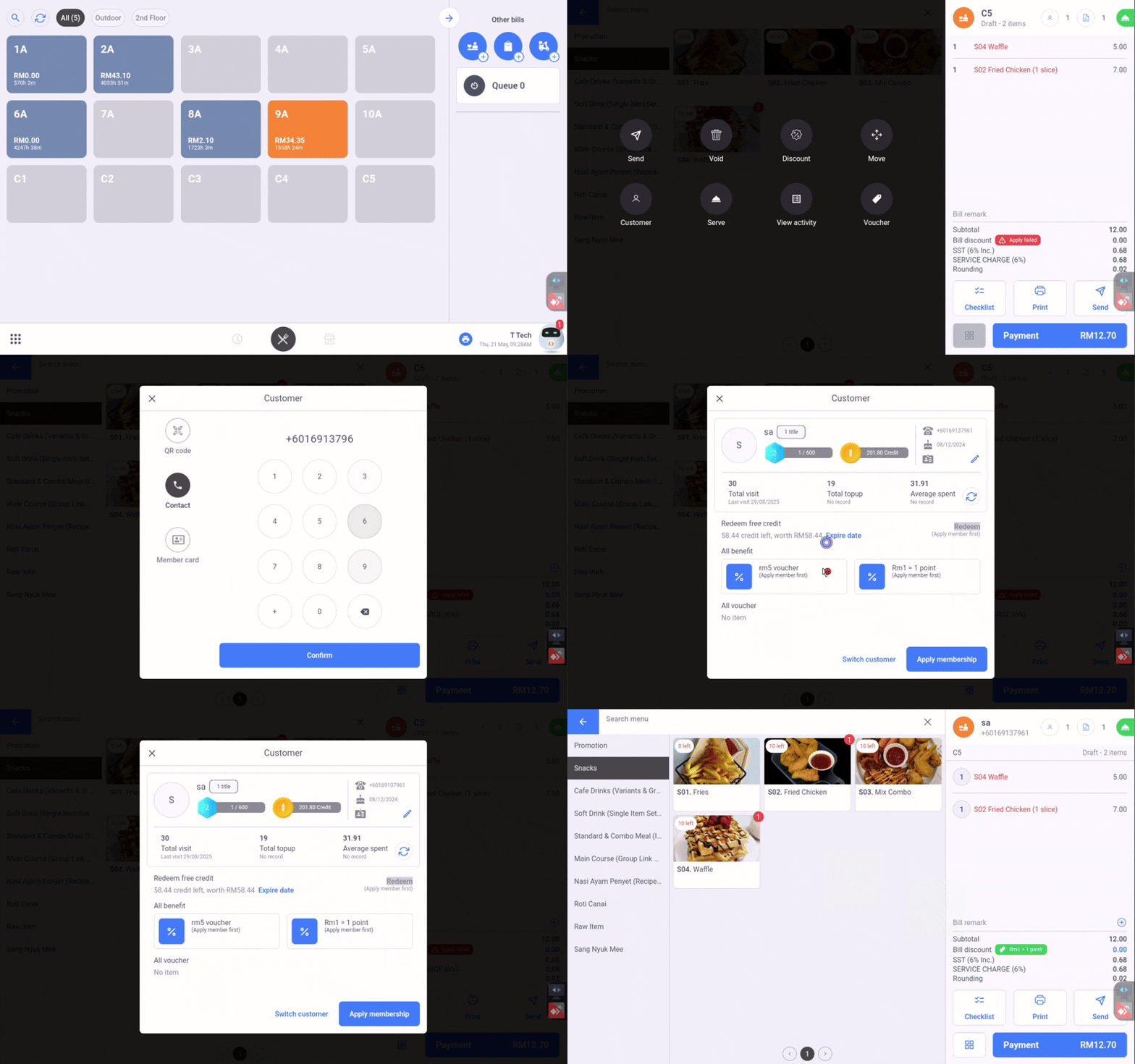
*When membership is applied, the memeber’s name and the member’s phone number will show on the top right.
Step 4 — Make Payment using membership
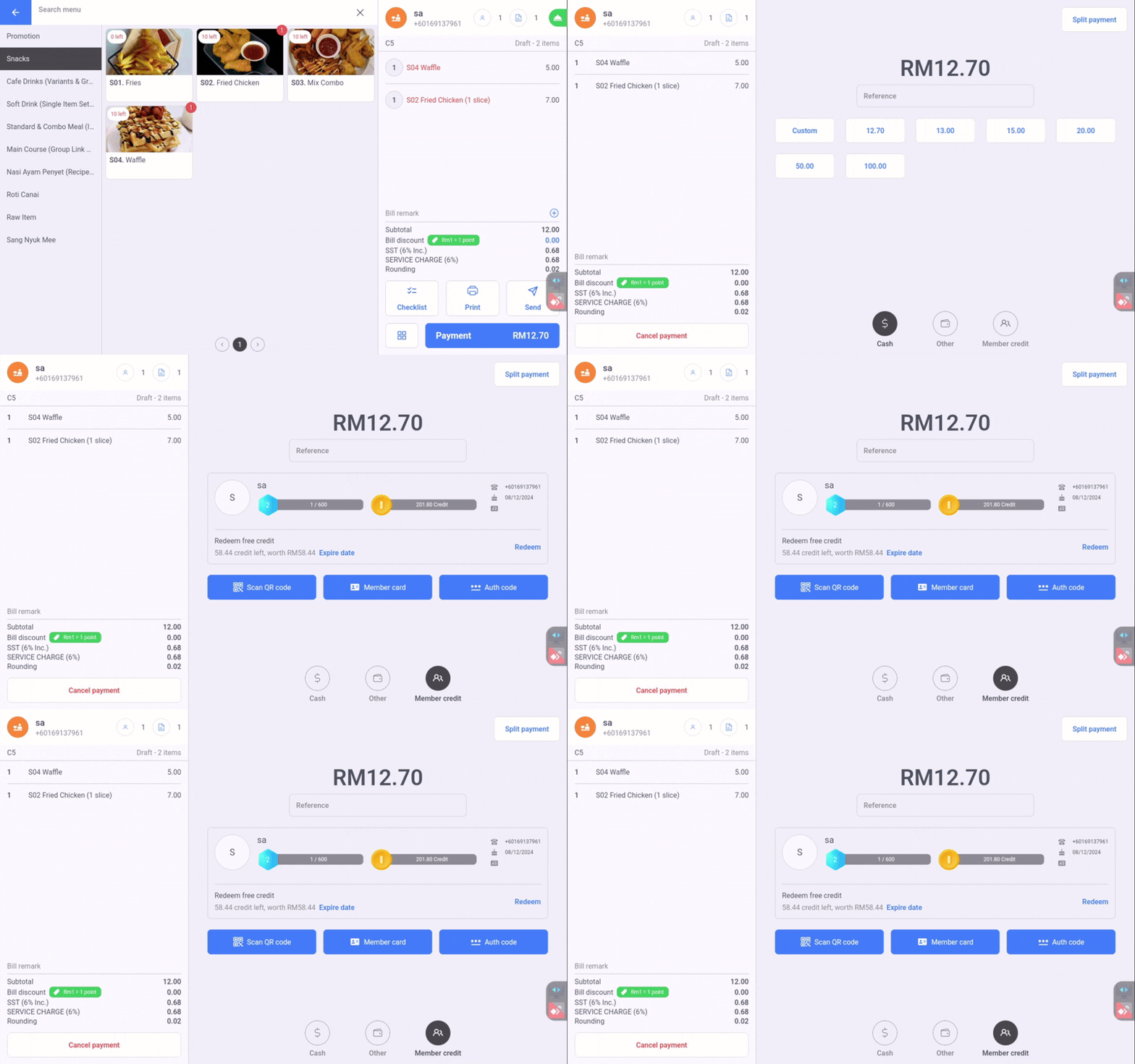
You can also make payment by credit if the membership is applied to order and make payment.
Order items as usual, then in the payment section there will have a member credit shows up here.
You can do use your member credit by scanning barcode, using membercard, or using the auth code from you FeedMe app.
How Loyalty Points Work on FeedMe POS
Businesses can customize loyalty programs based on their marketing strategy and customer retention goals.
Common Loyalty Examples
| Spending | Reward |
|---|---|
| RM1 spent | 1 point |
| 100 points | RM5 voucher |
| Birthday month | Free dessert |
| 10 purchases | Free drink |
The loyalty reward structure can be configured directly inside the FeedMe backend management portal.
How Customers Use Membership on FeedMe App
FeedMe also supports customer-facing membership and mobile ordering features.
Customers can:
- Check loyalty points
- Redeem vouchers
- Track purchase history
- Receive promotions
- Order food through QR ordering systems
This creates a complete digital loyalty ecosystem for restaurants, cafés, and food chains in Malaysia.
Typical Customer Membership Journey
1. Customer Registers
Customers can register:
- At the POS counter
- Through QR ordering pages
- Using their mobile number or QR code
2. Customer Makes Payment
Transactions are linked directly to the customer membership profile.
3. Loyalty Points Are Added Automatically
Points accumulate after successful payment.
4. Customer Returns
Customers can redeem:
- Rewards
- Vouchers
- Discounts
- Member-exclusive promotions
Benefits of FeedMe Membership for Malaysian Restaurants
Better Customer Retention
Reward systems encourage repeat customer visits.
Easier Marketing
Restaurants can promote:
- Birthday campaigns
- Seasonal promotions
- Member-only deals
Customer Data Tracking
Businesses can better understand:
- Popular menu items
- Customer spending habits
- Returning customer frequency
Digital Customer Experience
No physical membership cards are required, making operations more modern and efficient.
Offer Instant Rewards
Examples include:
- Free drink for new members
- First purchase discounts
- Bonus loyalty points during signup
Promote Membership at the Counter
Use:
- QR codes
- Table stickers
- Counter displays
- Digital screens
to encourage customer registration and improve signup rates.
FeedMe POS membership features help Malaysian F&B businesses build stronger customer relationships through digital loyalty programs and reward systems. By allowing restaurants to register customers as members through the POS terminal using their mobile number or QR code, businesses can create a faster and more seamless loyalty experience for both staff and customers.
By combining:
- POS transactions
- QR ordering
- Loyalty points
- Customer rewards
restaurants can improve customer retention while creating a smoother and more modern dining experience.
For cafés, restaurants, and food chains looking for How to register customer as Member in FeedMe, implementing a simple membership strategy through FeedMe POS can be an effective long-term solution for building customer loyalty and encouraging repeat visits.
If you would like to learn more about FeedMe POS membership setup, loyalty program configuration, or customer registration features for your business in Malaysia, feel free to contact us at +6014-609 1088 for consultation and support.